Your support docs, answering tickets
The document nobody opens
Every support desk has a document like this. Somebody senior sat down one quiet week and wrote out how things actually work: how to set up a new customer, why an order stays stuck, what each error message really means, when to stop and call engineering. It is usually very good. And it usually lives in a folder, opened by the person who wrote it and almost nobody else.
Meanwhile the ticket that document answers comes in again on Tuesday. An agent who joined last month spends twenty minutes rediscovering step three, or asks the one colleague who knows.
Parly's new knowledge base is about closing that gap. The answer stops living next to the inbox and starts showing up inside the ticket.
Import what you already have
Under Admin, Knowledge base, you upload your documentation as HTML, Markdown or plain text. Parly splits it at its headings, one article per section, and files each article under the section the document puts it in.
We cared about keeping the structure, because support documentation is mostly structure. Numbered steps stay numbered steps, laid out as a timeline. Menu paths like Admin › Carriers › New carrier become small path chips an agent can follow by eye. Callouts keep their tone: a green checklist, an amber warning. Status tables keep their coloured chips, and error messages become cards with the exact message on top and what it means underneath.
If you are writing from scratch, there is a writing guide and two blank templates in the app. The guide is itself a knowledge base, so importing it shows every building block on a real page.
Find the answer, inside the ticket
The knowledge base does not add a second AI. It teaches the AI assist you already have about your documentation. On a ticket, AI assist now opens as a panel beside the thread rather than at the bottom of a long sidebar, so it is one click away however far you have scrolled.
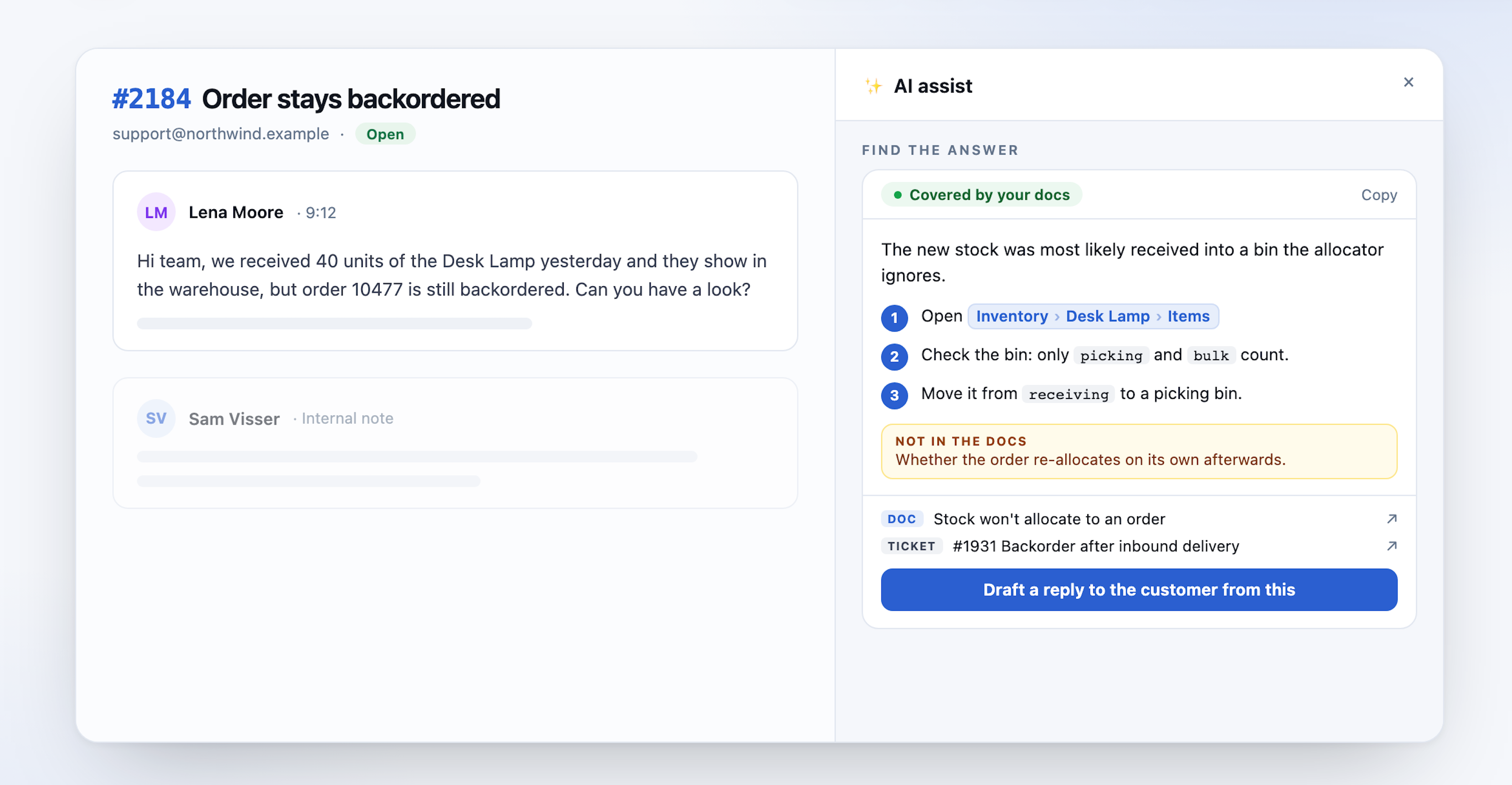
Click Find answer and AI assist reads the ticket against your documentation. What comes back is not a paragraph to decode. It is shaped like the thing an agent needs:
- A verdict: covered by your docs, partly covered, or not covered.
- A diagnosis in one or two sentences: what is most likely going on.
- Numbered steps, one action each, with the menu paths exactly as your documentation names them.
- What the docs do not cover, called out separately, so a gap is visible instead of papered over.
- Sources: links to every article it used.
An agent can also type a question, "how do I reset the sync?", to narrow it down.
The rule underneath is simple: it answers only from what you wrote. When the documentation does not cover something, it says so. We would rather show an honest gap than a confident guess, and a "not covered" answer is a useful signal in itself. It is the next article worth writing.
Your solved tickets count too
Documentation says how things should work. Solved tickets say what actually fixed it last time.
So Find answer also looks at closed tickets in the same mailbox that resemble the one in front of you, and lists them as sources next to the articles, each with its ticket number so the agent can open it and check. Your documentation stays the authority where the two disagree.
Two boundaries matter here. It only looks in the same mailbox, so nobody is shown a ticket from a desk they cannot open. And past tickets belong to other customers: their names, companies and order numbers are never carried into an answer or a draft. The fix travels. The details stay where they were.
A draft written for the customer, not for you
Most internal documentation is written for staff, and it should be. It names admin screens customers cannot see, tells agents to log in as the customer, says when to escalate to engineering. None of that belongs in an email to a customer.
Draft a reply to the customer from this turns the answer into an email the agent can edit and send. Internal procedure becomes what the customer should do on their side, or what we will do for them. Admin paths, internal tools and other customers' details stay out.
While we were here we fixed how every AI draft reads. Drafts used to arrive as one block of text. They now look like a support email: a greeting, short paragraphs, and numbered steps when there is more than one thing to do. The reply box grows with the text, so a draft no longer sits in a three-line scroll box.
A knowledge base your team can actually browse
Answers inside tickets are the point, but people also just want to look things up. Knowledge in the top bar opens your documentation as a small website: grouped by section, searchable, with the same steps, chips and callouts as the source. Press / anywhere to search. Titles filter as you type; Enter searches the full text and highlights where it matched.
Pricing
The knowledge base is an add-on for helpdesk mailboxes: €30 per mailbox per month, on top of helpdesk mode. You switch it on per mailbox and choose which knowledge bases that mailbox uses, so a support desk and an IT desk can each answer from their own.
AI assist itself is included in every plan while it is in preview; when we start metering AI usage, it will be its own line for every plan.
Importing and browsing work from day one. During your free first month the AI features are off; Find answer and drafts start when your paid plan begins.
If your team already wrote the answers down, this is how they start getting read. See how it works on parlyparly.com.
This post also appears on Parly.
More from the portfolio. Back to the blog
Have any feedback? Get in touch
Get new posts in your inbox.
Everything the portfolio publishes, from all eight products. One email when we publish, nothing in between.